How to Shrink a PDF for Online Forms and Upload Limits
Submitting documents online is common when applying for jobs, enrolling in schools, completing government forms, or sending business paperwork. However, many websites set a maximum file-size limit for PDF uploads. If your document is too large, the submission portal may reject it.
Fortunately, you can often shrink a PDF file to meet an upload requirement without making its contents difficult to read. The key is to reduce unnecessary file data while preserving important text, images, signatures, and other details.
In this guide, you will learn how to shrink a PDF for an online submission, choose the right compression method, and check your document before uploading it.
Why Do Online Submission Websites Limit PDF File Size?
Online portals need to receive, store, and process uploaded documents. File-size limits help manage storage requirements and improve upload performance.
You may encounter PDF size restrictions when submitting:
Job applications and CVs
School and university admission documents
Government forms and supporting evidence
Bank statements and financial records
Business proposals and reports
Scanned certificates and identification documents
The maximum permitted size varies by website. Some portals specify a limit for each individual file, while others set a total limit for all uploaded documents.
Before compressing your PDF, check the portal's exact file-size requirement. This helps you avoid unnecessary compression and maintain the best possible document quality.
How to Shrink a PDF for an Online Submission
Step 1: Check the Maximum File Size
First, identify the upload limit shown on the submission website.
For example, if the portal accepts files up to 5 MB and your PDF is 12 MB, you need to reduce the file size enough to meet the requirement.
It is sensible to leave a little room below the limit rather than aiming for exactly 5 MB, especially if the portal calculates file sizes differently.
Step 2: Open an Online PDF Compressor
Visit HuntPDF.com and find the Compress PDF tool.
An online compressor can help reduce file size without requiring you to install separate desktop software. Confirm that the tool's current upload limits and available compression options suit your document.
Step 3: Upload Your PDF
Select the document you need to submit.
Before uploading, make sure it is the correct version and includes all required pages. If the document contains confidential personal, financial, or legal information, review the tool's privacy and file-retention policies before proceeding.
Step 4: Choose a Suitable Compression Level
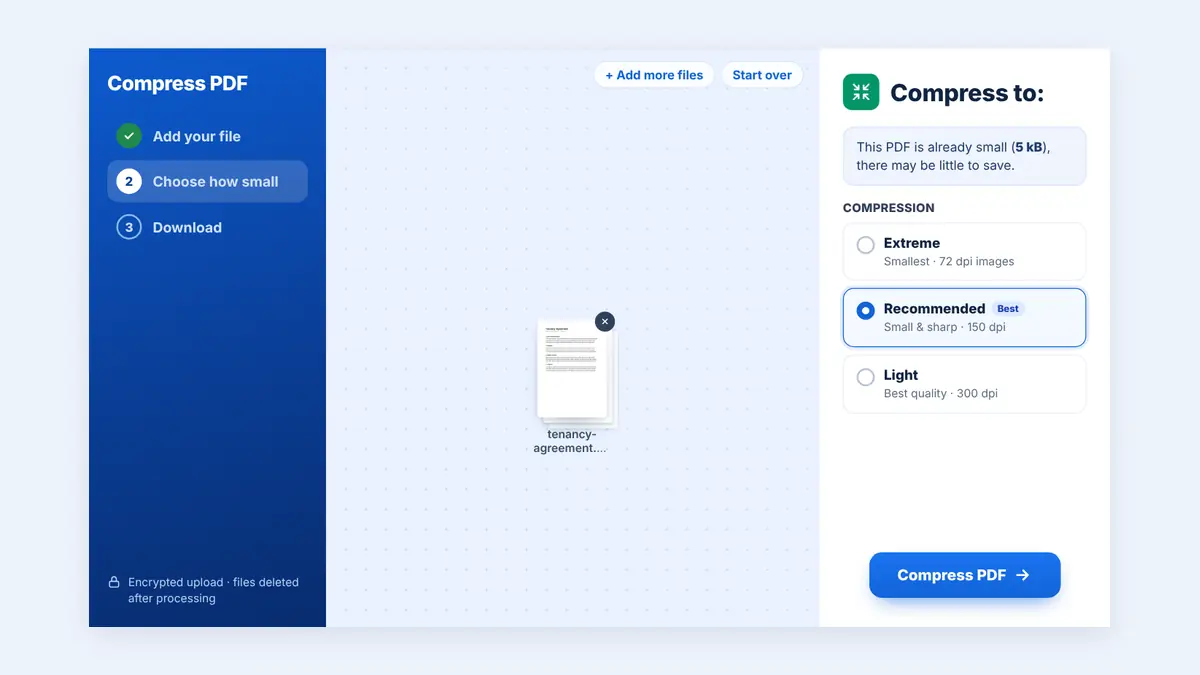
Choose a compression level: Recommended for most files, Extreme for the smallest size, or Light when quality matters most.
High quality: Suitable for certificates, detailed charts, and documents intended for printing.
Balanced compression: A useful starting point for most applications, reports, and supporting documents.
Smaller file size: Appropriate when the portal has a strict limit, provided the final document remains readable.
Avoid choosing the strongest compression automatically. A very small file is not helpful if important text or scanned details become unclear.
Step 5: Process and Download the PDF
Start compression and wait for processing to finish. Download the resulting PDF and check its actual file size.
If it still exceeds the portal's limit, try another available compression setting or consider other ways to reduce the file size.
Step 6: Review the Document Before Uploading
Open the compressed PDF and inspect every page.
Check that:
All pages are present and in the correct order.
Names, dates, and reference numbers remain readable.
Certificates, signatures, and stamps are clear.
Tables and financial figures are easy to read.
The file meets the portal's size and format requirements.
Once you have verified the document, upload the compressed version to the submission website.
Other Ways to Reduce PDF File Size
If compression alone does not make your document small enough, consider these alternatives.
Remove Unnecessary Pages
If the portal only requires selected pages, create a separate PDF containing the relevant information. Do not remove any pages required by the submission instructions.
Optimize Scanned Documents
Scanned PDFs can be large because each page may be stored as a high-resolution image. Scanning at an appropriate resolution and avoiding unnecessarily large images can help reduce file size.
However, ensure that small text, stamps, signatures, and other important details remain legible.
Export the Original Document Again
If your PDF was created from Word, PowerPoint, or another office application, try exporting the original document using appropriate PDF output settings.
Depending on the software, you may be able to choose an optimized output option that reduces file size while retaining acceptable quality.
Split Large Documents When Permitted
Some portals allow several supporting documents to be uploaded separately. If the portal accepts more than one file, you can split a large PDF into smaller files.
Always follow the submission instructions. Do not split a document if the portal requires one complete PDF.
Example: Shrinking a PDF to Meet a 5 MB Limit
Suppose your application portal accepts PDF files up to 5 MB, but your document is 15 MB.
Here is an illustrative example of how compression could help.
| Stage | File size |
|---|---|
| Original PDF | 15 MB |
| After compression | 6 MB |
| After further optimization | 4.5 MB |
These figures are examples, not guaranteed results. The actual reduction depends on the original PDF, its images, and the compression method used.
In this example, the final file is below the 5 MB limit. You should still inspect its quality before submitting it.
Common Mistakes to Avoid
Compressing Without Checking the Requirements
Some portals have specific rules for file format, page count, resolution, or file size. Read the instructions before making changes.
Making Scanned Documents Unreadable
Aggressive image compression may make small text, signatures, or stamps difficult to read. Always inspect scanned documents carefully.
Forgetting Required Pages
A smaller PDF is not useful if it excludes required evidence. Check the complete document before and after compression.
Uploading the Wrong Version
Give the compressed file a clear name and verify that you select the correct version when submitting your application.
Ignoring Privacy
Job applications, identification documents, and financial records can contain sensitive information. Check the online tool's privacy practices before uploading them.
Frequently Asked Questions
How can I reduce a PDF to under 5 MB?
Use a PDF compressor, select an appropriate compression setting, and check the resulting file size. If the PDF remains too large, optimize its images, remove unnecessary pages where permitted, or export it again from the original source.
How do I shrink a PDF without losing quality?
Start with moderate compression and compare the output with the original. Some PDFs can be optimized with little visible change, but significant size reductions may affect image quality.
Why is my PDF too large to upload?
Your PDF may contain high-resolution images, scanned pages, embedded resources, or unnecessary content. The submission website may also impose a strict per-file limit.
Can I shrink a PDF on my phone?
Yes. You can use a compatible online PDF compression tool in your mobile browser. Upload the file, process it, and download the compressed version.
Should I compress my CV before submitting it?
If your CV exceeds the portal's size limit, compression can help. Make sure the text, formatting, and any important graphics remain clear and readable.
Can I submit a compressed PDF to a government website?
You can generally submit a compressed PDF if it meets the website's file-size, format, and document-quality requirements. Follow the specific instructions provided by the relevant authority.
What should I do if my compressed PDF is still too large?
Try a different compression setting, optimize large images, or remove pages that are not required. If multiple files are allowed, splitting the document may also help.
Conclusion
Shrinking a PDF for an online submission is usually straightforward. Check the upload limit, use an appropriate compression method, download the smaller document, and inspect every page before submitting it.
The goal is to meet the file-size requirement without compromising the readability or completeness of your documents.
Visit HuntPDF.com to explore online PDF tools and prepare your documents for easier sharing and submission.
Free HuntPDF tools for this task
- Compress PDF online: three levels from Light to Extreme
- Split large PDFs: upload in smaller parts
- Delete unnecessary pages: cut size by removing pages
- HuntPDF.com: every free PDF and image tool in one place, with no sign-up and no watermark
Related guides: How to reduce PDF file size for sharing · Free PDF compressor: quality vs. size


Comments
Post a Comment