Merge PDF: Combine PDF Files Online for Free
Combining multiple PDF files can be frustrating when you need to organize documents for work, school, business, or personal use. Switching between files, managing separate attachments, and keeping pages in the correct order can waste valuable time.
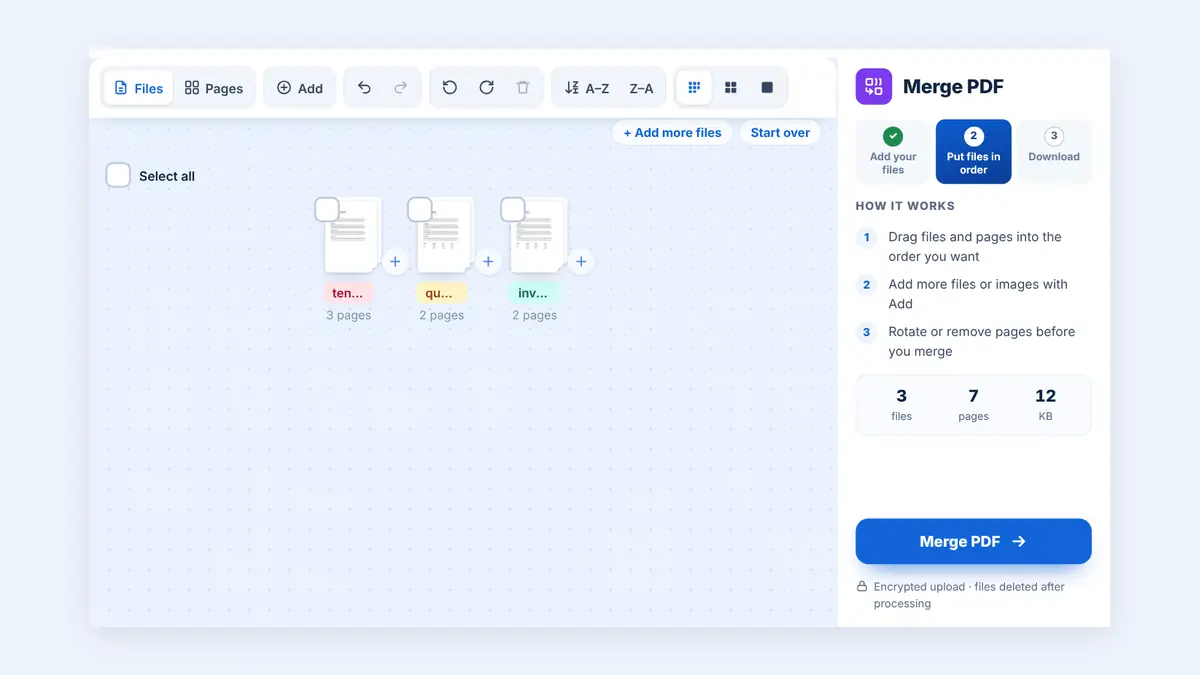
With HuntPDF, you can merge PDF files online into one organized document without installing software or creating an account. The tool is designed to make combining PDF documents simple, convenient, and accessible from your browser.
Whether you need to combine invoices, contracts, reports, assignments, or scanned documents, merging your PDFs can help you keep everything together in one file.
Why You Need to Merge PDF Files
Combining PDF documents offers several practical benefits for everyday tasks.
1. Keep Documents Organized
Instead of managing multiple files separately, combine related documents into a single PDF. This makes it easier to store, find, share, and review important information.
2. Simplify Email Attachments
Sending several documents individually can make emails harder to manage. Merging related PDFs creates one convenient attachment for clients, colleagues, teachers, or business partners.
3. Save Time at Work
Professionals frequently handle invoices, receipts, reports, proposals, and contracts. Putting related files together means less searching and fewer files to keep track of.
4. Create Professional Documents
A well-organized PDF is easier to read and share. You can bring supporting documents together into one file for presentations, applications, business records, or academic submissions.
How to Merge PDF Files Using HuntPDF
You can combine PDF files online in a few simple steps.
Step 1: Open the HuntPDF Merge PDF Tool
Visit HuntPDF.com and open the Merge PDF tool. Select the PDF files you want to combine from your device, or drag and drop them into the upload area.
Step 2: Arrange Your PDF Files
Review the uploaded documents and drag them into the order you want. You can also switch to the Pages view to move single pages between documents. Check that the documents are arranged correctly before processing. If you want more tips on page order, learn how to combine PDF files in our full guide.
Step 3: Merge Your PDF Files
Click the merge or process button to combine your selected documents. Wait for the tool to finish processing your files.
Step 4: Download Your Combined PDF
Download the resulting PDF and open it to check that the pages appear in the correct order. You can then save, share, email, or archive your combined document.
Ready to get started? Visit HuntPDF.com to find the PDF tools you need.
Key Features and Advantages of HuntPDF
HuntPDF provides convenient online PDF utilities for everyday document tasks.
Free PDF tools: Use available PDF utilities without purchasing desktop software.
No watermark: HuntPDF never adds a watermark to your files.
No account required: Use every tool without signing up.
Browser-based access: Work directly from a supported web browser without installing a dedicated desktop application.
Mobile and desktop compatibility: Access the website from supported smartphones, tablets, laptops, and desktop computers.
Simple workflow: Upload your document, choose your settings, process it, and download the result.
Multiple PDF utilities: Explore other available tools for converting, organizing, optimizing, and securing PDF documents.
Is Online PDF Merging Right for You?
An online PDF merger is useful when you need to combine documents quickly without installing additional software. It can be especially convenient for students, office workers, freelancers, small businesses, and anyone who regularly handles digital documents.
For confidential or sensitive documents, review the tool's current privacy policy and file-retention practices before uploading. Use an approved document-handling process when required by your organization.
Frequently Asked Questions
Is HuntPDF free to use?
HuntPDF offers free online PDF utilities. There are no daily limits, and each file can be up to 260 MB.
Will merging PDF files reduce their quality?
Merging PDFs generally combines their pages without requiring image compression. However, the output can depend on how the tool processes the original documents, so review the downloaded file if image quality is important.
Are my PDF documents secure when using HuntPDF?
Files are processed over an encrypted HTTPS connection and deleted automatically after processing. Before uploading confidential documents, review HuntPDF's current privacy information, including how files are processed, stored, and deleted.
Can I merge PDF files on my phone?
You can access HuntPDF through a supported mobile browser. HuntPDF works in mobile browsers on Android and iPhone, so you can merge files without a computer.
Do I need to install software to merge PDFs online?
No desktop installation is needed when using a browser-based PDF merger. Open the website, upload your files, process them, and download the resulting document.
Merge PDF Files Online with HuntPDF
Managing multiple PDF documents does not need to be complicated. Combining related files into one document can make your work more organized, simplify sharing, and help you keep important information together.
HuntPDF brings convenient PDF utilities into one online platform, making common document tasks easier to access from your browser.
Try HuntPDF today: Visit HuntPDF.com and explore its free PDF tools to simplify your document workflow.
Free HuntPDF tools for this task
- Merge PDF online: combine PDFs and images into one file
- Compress the merged PDF: make it small enough to email
- Number the pages: add page numbers after merging
- HuntPDF.com: every free PDF and image tool in one place, with no sign-up and no watermark
Related guides: How to combine PDF files in the right order · How to add page numbers to a PDF


Comments
Post a Comment