How to Sign a PDF Online for Free: Draw, Type or Upload
Signing a PDF document online is a convenient way to complete forms, approve documents, and send signed paperwork without printing or scanning pages. Whether you need to sign a business agreement, application form, invoice, or personal document, an online PDF signing tool can help you add your signature digitally.
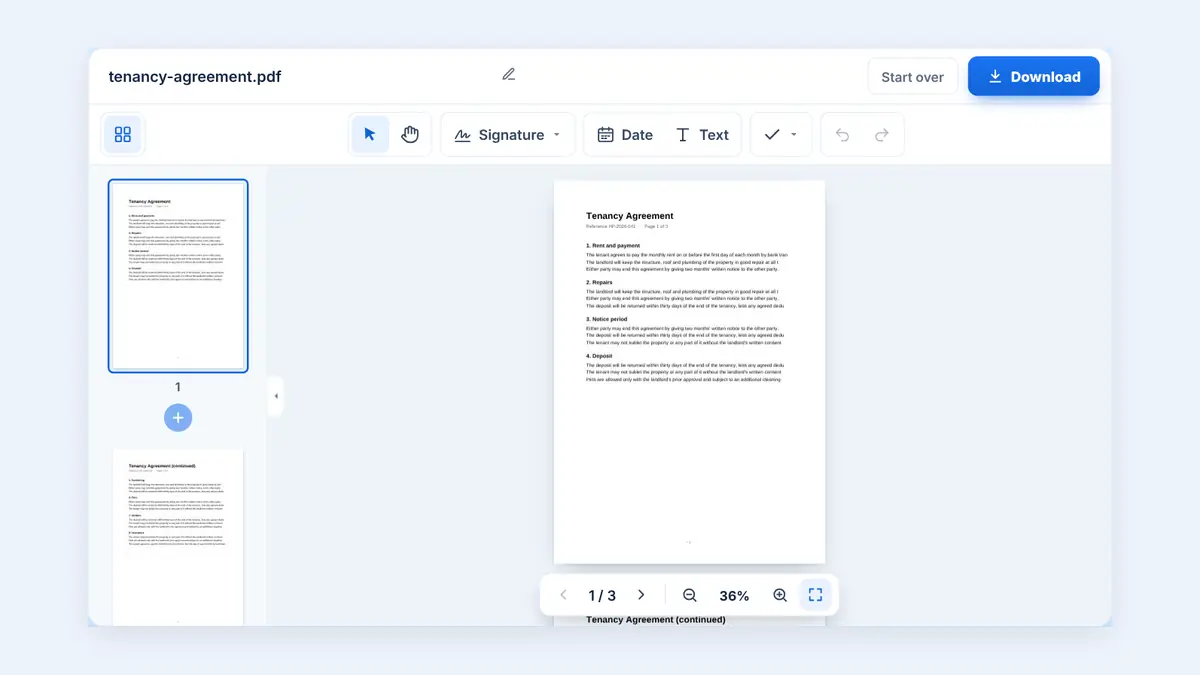
In this guide, you will learn how to sign a PDF online, explore different signature methods, and understand how to save and share your signed document securely.
What Does It Mean to Sign a PDF Online?
Signing a PDF online means adding a signature to a PDF document using a web-based tool or digital signing service. HuntPDF gives you three ways to sign: draw your signature, type your name, or upload a photo of your handwritten signature. Certificate-based digital signatures need specialised software.
These methods are not identical. A visible signature can show who signed a document, while a certificate-based digital signature can provide additional identity verification and help detect changes made after signing.
Choose a method that meets the requirements of the person or organization receiving your document.
How to Sign a PDF Document Online for Free
The exact steps depend on the PDF signing tool you use. Most online services follow a similar process.
Step 1: Open an online PDF signing tool
Choose a service that supports signing PDF files. Check whether it offers the signature method you need and whether the feature is available in its free plan.
Step 2: Upload your PDF document
Select the PDF file from your computer, tablet, or mobile phone. Before uploading a sensitive document, review the service's privacy policy and file-retention practices.
Step 3: Create your signature
Common options include:
Draw your signature using a mouse, touchpad, or touchscreen.
Type your name and select a signature style.
Upload an image of your handwritten signature.
Apply a digital signature using a supported digital certificate.
Step 4: Place the signature on the document
Move your signature to the appropriate location, such as a designated signature line. Adjust its size so that it fits neatly without covering important text.
If the document requires multiple signatures or initials, check each relevant field before continuing.
Step 5: Save or download the signed PDF
Use the tool's save, export, or download option to obtain the signed document. Some services may require an account or payment for particular features.
Step 6: Review the signed document
Open the saved PDF and confirm that the signature is visible, correctly positioned, and present on the intended page. Check that the rest of the document remains readable. Sign PDF Online Free
Different Ways to Sign a PDF
There are several ways to add a signature to a PDF. The right option depends on the document's purpose and the recipient's requirements.
1. Draw your signature
Drawing a signature can make a document look similar to one signed by hand. You can use a touchscreen, stylus, mouse, or touchpad.
This method is convenient for routine forms and documents that accept a visible electronic signature.
2. Type your name
Some tools let you type your name and display it in a signature-style font. This is quick and convenient when a handwritten appearance is not necessary.
However, a typed name alone may not satisfy every recipient's signing or identity-verification requirements.
3. Upload a signature image
You can use an image of your handwritten signature if the signing tool supports image uploads. A transparent-background image can help the signature blend naturally with the document.
Protect signature images carefully. Someone who obtains the image may be able to reuse it, so avoid sharing it unnecessarily.
4. Use a certificate-based digital signature
A certificate-based digital signature uses cryptographic technology to help verify the signer's identity and detect subsequent document changes.
This option is often more appropriate when the recipient requires document integrity checks or a particular digital-signature standard. Follow the recipient's instructions regarding certificates, identity verification, and approved signing software.
Is an Electronic Signature the Same as a Digital Signature?
The terms are sometimes used interchangeably, but they can refer to different methods.
| Feature | Electronic signature | Certificate-based digital signature |
|---|---|---|
| Typical form | Drawn, typed, or otherwise electronically applied signature | Cryptographic signature linked to a digital certificate |
| Main purpose | Indicate agreement or approval | Help verify identity and document integrity |
| Identity verification | Depends on the process used | Can provide certificate-based verification |
| Detecting document changes | Not necessarily | Supported PDF signatures can help reveal changes |
| Requirements | Depend on the recipient and applicable law | May require a certificate or approved signing service |
A simple drawn signature is not automatically a certificate-based digital signature. Likewise, the legal validity of any signing method depends on the applicable law, the document type, and the circumstances. Sign PDF Online Free
How to Sign a PDF on a Mobile Phone
You can sign many PDF documents using a mobile browser or an application that supports PDF signing.
Open the PDF signing tool or application.
Select the document you need to sign.
Choose Draw, Type, or Upload to create your signature.
Draw, type, upload, or digitally apply your signature.
Position the signature on the correct page.
Save the signed document and open it to verify the result.
On a phone, zoom in before positioning the signature to avoid covering nearby text. For lengthy agreements or documents requiring multiple signatures, a computer may provide better control.
Common Problems When Signing a PDF
The signature will not stay in place
Some editors require you to confirm the placement before saving. Reopen the saved document to check that the signature sits in the right place.
The signature looks too large or too small
Resize the signature before saving. Keep it within the designated area and avoid obscuring text, dates, or other required fields.
The signed PDF cannot be downloaded
The service may require you to complete a final save or export step. Some features may also require registration or a paid plan.
The recipient says the digital signature is invalid
A certificate-based signature may be untrusted, expired, revoked, or associated with changes to the document. Check the PDF signature details and follow the recipient's instructions. A visible image of a signature does not provide the same cryptographic verification.
The PDF is password-protected
Some protected PDFs restrict editing or signing. You may need permission from the document owner or an authorized method to sign the file. Do not attempt to bypass access restrictions.
Is It Safe to Sign a PDF Online?
Online signing can be convenient, but documents may contain personal, financial, or confidential information. Before uploading a file, check the service's security practices and understand how it stores and handles your data.
Follow these precautions:
Use a trusted signing service.
Review privacy and file-deletion policies.
Avoid uploading confidential documents to unfamiliar websites.
Keep an unsigned original copy for your records.
Store the signed PDF securely and share it only with intended recipients.
Use certificate-based signing or an approved signing platform when required.
For contracts, financial agreements, government forms, or other legally significant documents, confirm the required signing method before proceeding. Sign PDF Online Free
Sign PDF Documents with HuntPDF
HuntPDF offers online PDF utilities to help users work with documents through a browser. Visit Sign PDF Online Free to explore the tools currently available.
Before choosing a workflow, confirm whether HuntPDF supports PDF signing directly. If a dedicated signing tool is available, follow its instructions to add your signature and save the finished document. If not, use a reputable PDF signing service that supports the signature method required by your recipient.
Frequently Asked Questions
Can I sign a PDF online for free?
Yes. Some online services let you add a drawn or typed signature for free. Availability, file limits, account requirements, and advanced signing features vary by provider.
Can I sign a PDF without printing it?
Yes. A compatible PDF signing tool can let you add a signature electronically and save the document without printing it.
Can I sign a PDF using my phone?
Yes. Many signing services work on mobile devices. You can often draw a signature with your finger or use another supported signing method.
Does signing a PDF make it legally binding?
Not automatically in every situation. Legal effect depends on the applicable law, the document type, the signing process, and any requirements imposed by the recipient.
Can I add more than one signature to a PDF?
Yes. Add your signature to each place that needs it, then check every page before you download. Check whether each signer must use a separate signing session.
Can I edit a PDF after signing it?
Some PDFs can be modified after a visible signature is added, but changes may affect the validity of a certificate-based digital signature. Avoid modifying a signed document unless permitted, and follow the required signing process if corrections are necessary.
How can I verify a signed PDF?
Open the file in a PDF viewer that supports signature validation. For certificate-based signatures, inspect the signature status, certificate information, and any warnings about changes to the document.
Conclusion
Signing a PDF online can save time and eliminate the need to print, sign, and scan routine documents. Choose the signing method that matches your document's requirements, position the signature carefully, and review the saved file before sending it.
Visit HuntPDF.com to explore available PDF tools and find a suitable workflow for your document needs. Sign PDF Online Free
Free HuntPDF tools for this task
- Sign a PDF online: draw, type or upload your signature
- Fill in PDF forms: type straight into form fields
- Password-protect a PDF: lock the signed file before sending
- HuntPDF.com: every free PDF and image tool in one place, with no sign-up and no watermark
Related guides: How to fill in a PDF form online · How to cut out a signature from a photo


Comments
Post a Comment